Word Serenity: Fun Brain Game
- 4.7
- Rating
- 1.00M
- Installs
- Free
- Price
 Analysis by App-foxy
I usually know within the first few minutes whether a word game is genuinely relaxing or simply another source of pressure. Word Serenity: Fun Brain Game makes a good first impression because it keeps the basic idea easy to understand: solve crossword-style puzzles and search for words while giving your attention a quiet, focused task. It is a free word game from HI STUDIO LIMITED, rated for Everyone, and it feels aimed at people who want short sessions rather than a demanding competitive experience.
The game belongs to the word-puzzle category, but it sits between two familiar styles. Crossword puzzles ask you to think about clues and spelling, while word searches reward visual scanning and pattern recognition. Moving between those activities gives the experience more variety than a single puzzle format. I found that useful when I wanted something calm but did not want to repeat exactly the same mental action for a long stretch.
It is also a well-established choice rather than an obscure new release. The game arrived on February 2, 2020, has passed one million installs, and holds a 4.7 average from around twenty-nine thousand ratings. Those figures suggest that its simple approach has found a sizeable audience. Still, popularity alone does not make it right for everyone, so the important question is how it feels when you are sitting down to play for the first time.
You May Also Like

 Blood Strike: 2.5 Anniversary
Blood Strike’s Loadouts Turn Every Drop Into a Tactical Gamble
A close look at Blood Strike’s custom loadouts: how fast access to signature weapons reshapes its battle royale rhythm, rewards preparation, and narrows the gap between fights.

 Pandora - Music & Podcasts
Pandora’s Music Is Easy to Start, but Harder to Recover
Pandora’s strength is its low-effort path from a seed to a station. Its weak spot is how much confidence it asks you to place in connection, setup, and quiet recovery.

 8 Ball Pool
 Is Built on Rivalries, Rematches, and Routine
A close look at the rivalries, rematches, shared routines, and unanswered safety questions that turn a quick pool match into a persistent mobile community.

 Samsung Music
’s Quiet Strength Is Playing What You Already Own
Its reach comes less from spectacle than from dependable access to a personal library. That simplicity is both the app’s strongest retention engine and its ceiling.

 AccuWeather: Weather Radar
AccuWeather Review: A Quick, Clear Forecast for Everyday Decisions
For everyday plans, the best forecast is the one you can understand quickly. AccuWeather makes rain timing, radar, and local conditions easy to act on, with a few trade-offs.

 Hill Climb Racing
Why Hill Climb Racing Still Turns Crashes Into One More Run
A tiny car, a bumpy hill and one more upgrade: Hill Climb Racing keeps resurfacing because its simple chaos makes every near-miss feel personal.
More From Our News Desk



Starting smoothly and finding your first win
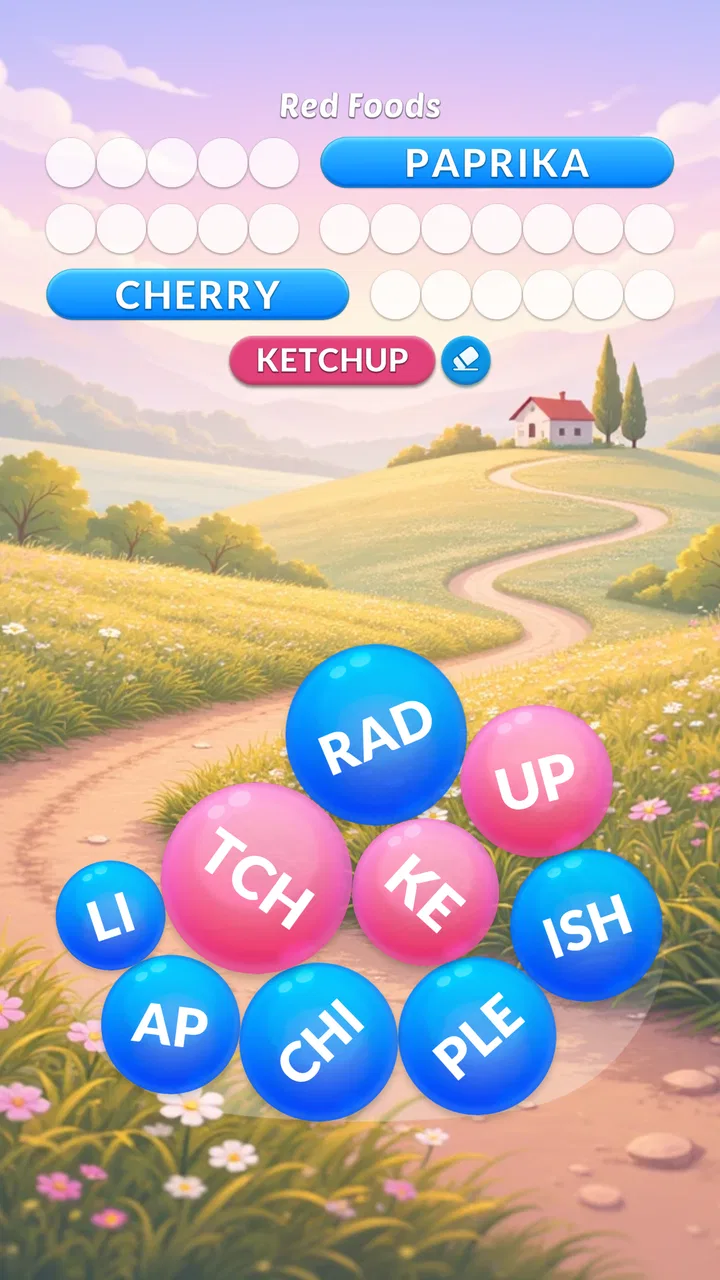
I’d use the first session to learn how each puzzle accepts an answer, rather than trying to race through the board. Starting with one clue or one distinctive word gives you a quick way to understand the rhythm and build confidence. Once that feels familiar, you can decide whether you prefer the language-based challenge or the more visual search.
What the first session feels like
After installing it, I would approach the opening session with a small goal: complete one puzzle without worrying about speed or trying to understand every option immediately. That mindset suits the game. It is not a title that needs a long tutorial before you can do anything useful. The central actions are familiar enough that a first-time player can begin by reading a clue, looking for letters, or tracing a possible word.
The presentation is designed around a gentle puzzle routine rather than a dramatic game world. That matters because the appeal is concentration. You can open it while taking a break, during a quiet commute, or before bed and start working on a small challenge without having to remember a complicated storyline. For a parent looking for an age-friendly word activity, the Everyone content rating also makes the game easier to consider, although younger players may still need help with unfamiliar vocabulary.
The free price removes the biggest barrier to trying it. You can install the game and decide for yourself whether the puzzle style fits your habits before spending anything. There are in-app purchases ranging from $0.99 to $99.99 per item, so I would treat optional spending carefully. A free download is convenient, but it does not mean every possible convenience or extra is included without cost.
Getting ready without overthinking it
The game runs on Android devices using version 7.0 or later. For a first-time user, the practical advice is simple: install it on the device where you are most likely to play short sessions, then keep the first attempt deliberately unhurried. Word puzzles are much less enjoyable when you begin by rushing through menus or tapping randomly because you feel you should progress immediately.
I would also make a personal rule about hints before starting. If a clue or hidden word slows you down, spend a little time testing possibilities first. Hints can be useful when you are genuinely stuck, but using them too early removes the most satisfying part of a puzzle: noticing the relationship between the clue and the answer yourself. This is one of the first meaningful choices the game gives you, even though it is not a complicated strategy system.
A useful setup habit is to play with the phone held in the position that gives your eyes the clearest view of the puzzle. Word searches depend on spotting letter sequences, and cramped viewing can make a straightforward board feel harder than it is. I found that changing my grip or taking a short pause was often more helpful than repeatedly tapping the same area.
How to reach the first successful action
For the crossword side, I recommend beginning with the clue that seems most obvious rather than following the puzzle from top to bottom. One answer can reveal letters that make neighboring clues easier. This creates a natural chain: solve a clear clue, use the letters as anchors, then return to the less certain entries. It is a better opening workflow than staring at the hardest clue and assuming the whole puzzle is beyond you.
For word searches, scan in a consistent order. I usually check across the rows first, then columns, and finally diagonals. I also look for unusual letters from the target word, because they are easier to track than common letters. This method turns the board from a wall of random characters into a set of manageable checks. It is a small technique, but it makes the first completed word feel earned rather than accidental.
The first success is not only about finishing a board. It is about learning how the game responds to your input and how much attention each puzzle format requires. Crossword clues reward language knowledge and flexible thinking. Word searches reward patience and visual organization. If one side feels more natural, use it as your entry point and return to the other when you want a change of pace.
Confusion that can slow new players down
The main source of confusion is assuming that every difficulty comes from the same skill. A clue may be difficult because you do not recognize the intended meaning, while a word search may be difficult because your eyes are scanning inefficiently. Treating both problems as “I do not know enough words” can lead to unnecessary frustration. When a search board feels impossible, slow down and change your scanning direction before deciding that you need assistance.
Another common mistake is tapping through a puzzle without reading the clue carefully. Crossword wording can be deliberately broad, and the first answer that comes to mind may not fit the available letters. I prefer to use the crossing letters as a check rather than forcing an answer because it sounds plausible. That habit is especially helpful for players who are used to quick mobile games and may initially expect every tap to produce immediate progress.
It is also worth remembering that a relaxing game can still contain moments of friction. If you want a word game with a strict competitive timer, head-to-head matches, or a large social component, this is probably not the best match. Its strength is the private puzzle routine. Players who prefer fast rounds, leaderboards, or constant external goals may find the experience too quiet.
Making the next puzzle more enjoyable
Once the first puzzle is complete, I would avoid treating the game as a test of endurance. A short session can be enough. Completing one crossword and stopping while your attention is still fresh often feels better than continuing until every clue becomes irritating. This is especially useful if you are using the game as a break from work or study rather than as your main entertainment.
For vocabulary practice, I like keeping a mental note of words that were unfamiliar or had an unexpected meaning. The game can become more valuable when you use each puzzle as a small language lesson instead of simply chasing completion. You do not need a notebook or a formal study plan; pausing briefly to remember why an answer fit can make the next puzzle easier.
For visual focus, word searches work well as a deliberate reset between more demanding tasks. I would play one when I need to shift attention away from a screen full of messages or documents. The trade-off is that the same visual focus can become tiring if you play too long without a pause. The game is relaxing in short doses, but “relaxing” does not mean your eyes and concentration never need rest.
How it compares with familiar alternatives
Compared with a traditional newspaper crossword, this game is more convenient because it is always available on a phone and can be used in brief sessions. A paper crossword may offer a stronger sense of physical progress and a different kind of offline ritual, but it is less flexible when you are away from a desk. This app is the better choice for portability and quick access, while a printed puzzle may suit someone who dislikes tapping on a screen.
Compared with a dedicated word-search book, the game offers a more guided digital experience and makes switching between puzzle styles easier. A book can be cheaper after purchase and avoids in-app purchase decisions, but it cannot provide the same immediate convenience of carrying many puzzles in one place. I would choose the app for spontaneous play and a book for a screen-free evening.
Compared with competitive word games, Word Serenity is less stressful but also less socially motivating. There is no reason to expect the same urgency as a game built around opponents or timed matches. That is a strength if you want to unwind and a weakness if competition is what keeps you engaged. The right choice depends on whether your priority is calm concentration or measurable performance against other players.
Who should try it and who should skip it
I would recommend it to casual puzzle fans, people who enjoy crossword clues but also want a simpler visual alternative, and anyone looking for a short mental break. It can also suit families because the age rating is Everyone, although the actual vocabulary may not be equally easy for every child. A player who enjoys gradually improving at recognizing patterns and interpreting clues will get more from it than someone who wants constant novelty.
I would be more hesitant to recommend it to players who need a detailed progression system, deep customization, or a strong multiplayer identity. It is also not ideal if you dislike optional purchase prompts in free games or prefer to pay once and remove all uncertainty. In that situation, a paid standalone crossword app or a physical puzzle book may feel more comfortable.
The current version is 4.3.4, which makes it sensible to keep the app updated through the normal store process so you are using the available build. I would not install it expecting a large action-game feature set. Its value comes from the core loop: read, search, test an answer, and enjoy the small satisfaction of being right.
My final recommendation for a first-time player
My advice is to begin with one puzzle, solve the easiest clue or locate the most distinctive word, and let that first answer guide the rest of the board. Do not spend immediately, and do not judge the game by how quickly you finish. Give yourself a few sessions to decide whether the combination of crossword thinking and word-search scanning fits the kind of break you actually need.
After using it this way, I see the game as a reliable casual word companion rather than a groundbreaking puzzle system. Its free entry, Everyone rating, broad availability, and strong average rating make it easy to try, while the two puzzle styles help prevent the routine from becoming completely repetitive. The limitations are equally clear: it may feel too gentle for competitive players, and optional purchases mean careful users should pay attention before confirming anything.
My honest take is that it works best when you want a calm, focused five- or ten-minute activity. If that describes your everyday use case, Word Serenity: Fun Brain Game is worth trying. Start slowly, use crossing letters and systematic scanning instead of guessing, and stop when the session has refreshed you rather than when the game has simply consumed more time.
FAQs for Word Serenity: Fun Brain Game
01What is Word Serenity: Fun Brain Game?
Word Serenity: Fun Brain Game is a relaxing and challenging word puzzle app designed to stimulate your brain while offering a serene gaming experience. Players are tasked with finding hidden words from a grid of letters, enhancing vocabulary and cognitive skills along the way. It's perfect for those who enjoy word games and mental challenges.
02Is Word Serenity suitable for all ages?
Yes, Word Serenity is suitable for players of all ages. The game features various levels of difficulty, making it accessible and enjoyable for children, teens, and adults alike. Its intuitive design and helpful hints ensure that even younger players can engage without frustration, while seasoned wordsmiths will find plenty of challenges.
03Are there in-app purchases or ads in Word Serenity?
Word Serenity is free to download and play, but it does include optional in-app purchases and ads. Players can choose to purchase additional coins to unlock hints or remove ads. However, the game provides a substantial amount of free content, so purchases are not necessary to enjoy the full experience.
04Does Word Serenity require an internet connection?
No, Word Serenity does not require an internet connection to play. You can enjoy the game offline, making it perfect for on-the-go entertainment. However, an internet connection might be needed for certain features, such as purchasing in-app items or watching ads for additional bonuses.
05How does Word Serenity help improve cognitive skills?
Word Serenity enhances cognitive skills by challenging players to find words within a grid of scrambled letters, improving vocabulary, pattern recognition, and problem-solving abilities. The increasing difficulty of levels encourages strategic thinking and memory retention, making it not only entertaining but also beneficial for mental agility.
Pros
- Engaging puzzles keep your mind sharp.
- Intuitive interface with smooth navigation.
- Regular updates with new levels.
- No intrusive ads interrupting gameplay.
- Suitable for all ages
- enhancing vocabulary.
Cons
- Limited free content without in-app purchases.
- Requires internet for daily challenges.
- Occasional loading delays on older devices.
- Some puzzles can be repetitive over time.
- Lack of multiplayer or social features.

Word Serenity: Fun Brain Game
Gallery